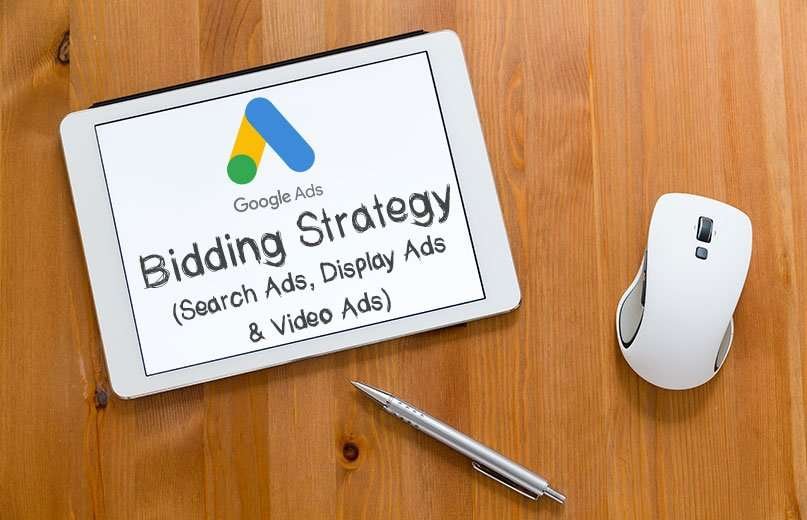
Google Ads gives you several ways to bid for your ads, depending on what matters most to you and your business. This blog will walk you through the different types of bidding strategies so that you can choose the best strategy for you, whether you’re creating your first campaign or have been running ads on Google for a while.
What is ‘Bidding Strategy' in Google Ads?
Bidding Strategy is a very essential part of Google ads as it helps a digital marketer in accomplishing a particular goal such as getting traffic, sales or just brand awareness/ reach. A bid strategy sets bids for your ads based on that ad’s possibility to result in a click or conversion. Choosing the right bid strategy can help one to get measurable business outcomes.
Basically, there are 3 types of Bidding strategies:
- Manual Bidding Strategy
- Automated Bidding Strategy
- Smart Bidding Strategy
Manual Bidding Strategies
Manual Bidding Strategy differs from automated bidding strategies that let Google bid for you. For digital marketers who wish to be in full control of their keyword bid amounts, manual bidding strategies are the best option. Manual bidding offers marketers the highest degree of oversight on how their ad budgets are allocated, but that also means investing more time evaluating the performance of keywords, determining how to optimize performance, and implementing any bid changes that are necessary. The outcome of this bidding strategy relies on the digital marketer’s experience, intuition of keyword performance to get good ROI.
1. Manual Cost-Per-Click (CPC)
With Manual Cost-Per-Click (CPC) bidding, you can set a maximum price on the cost of someone clicking on your ads. Google’s Algorithm will not play any role in making predictions or driving cost per click. For Manual CPC bidding campaigns, Advertisers set a maximum cost-per-click, that is the highest amount that the advertiser is willing to pay for each keyword manually on the ad and the bids don’t change until advertisers go back and change themselves. You can get good value with this bidding method because you need to pay only when a viewer is interested enough to click your ad and learn more.
To use this strategy in Search Ads, one must select the option Manual CPC under non-recommended Bidding options, making sure the Enhanced CPC option is Ticked off, as depicted in the image below;

The same applies to Display Ads as well, in addition to entering the specific amount of bid, as depicted in the image below;

2. Manual Cost-Per-View (CPV)
Manual cost-per-view (CPV) bidding simply means what you pay for video views or interactions in a TrueView in-stream video. A view counts if the video ad has been watched for at least 30 seconds or views are also counted when users interact directly with the video, usually by clicking on an overlay or companion banner. Advertisers running video ads on the Google display ads can utilize the manual CPV bidding strategy to bid for video views on the Google display network. This bidding strategy is a good fit if your main campaign goal is to drive video views, rather than something like conversions or clicks.
To use this strategy in Video Ads, one must select the option “Maximum CPV” under Bidding strategies, as depicted in the image below;

3. Manual Cost-Per-Thousand Impressions (CPM)
With Manual cost-per-view bidding, you’ll pay based on the number of impressions, that is times your ads are shown. Google only offers manual CPM bidding for video advertising campaigns on the Google display network. Instead of paying for video ad placements on a cost-per-view basis, advertisers can choose to bid for video impressions directly using the manual CPM bidding strategy. It is a bidding strategy where the average amount is set manually for every thousand impressions made and hence it helps to reach the eyes of maximum people.
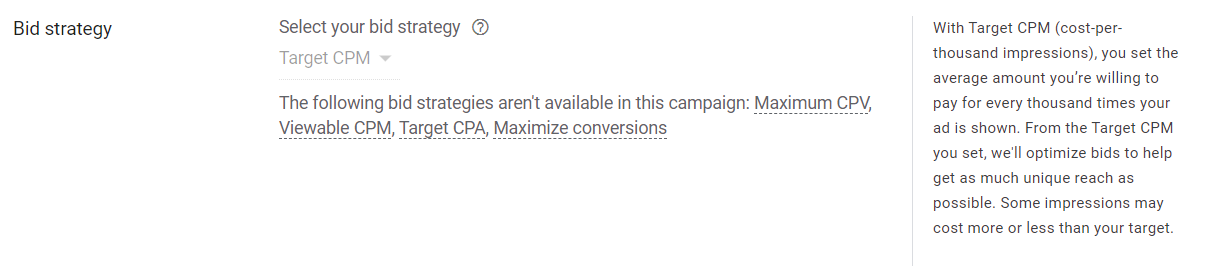
To use this strategy in Video Ads, one must select the option “Target CPM” under Bidding strategies and enter the amount as depicted in the image below;
4. Viewable Cost-Per-Thousand Impressions (vCPM)
CPM and viewable CPM often get mistaken as the same, but they differ slightly. CPM plays a vital role in calculating how much to spend on advertising and includes all ads showcased on the website. Whereas Viewable cost-per-thousand-impressions (vCPM) refers to the cost per thousand viewable impressions. This means that advertisers are charged based on 1000 viewable impressions of the ad appearing in the Google display network rather irrespective of clicks and traffic. Using vCPM, advertisers only pay for active and visible ads on a user’s screen. The ad’s visibility is crucial in deciding the campaign’s cost.
Formula to calculate vCPM:
Budget ÷ [(Total Ad Impressions * % of Ad Viewability) ÷ 1000 = vCPM
To deliver an increase in vCPM, advertisers should work on improving ad viewability strategies. It is crucial to know what percent in view of the ad is visible and the viewable impressions to determine the final vCPM, any portion of ads not visible on-screen, lying outside the fold (above or below) gets deducted from the whole as a percentage. When an ad is placed above the fold, ad viewability increases as these ad units remain visible without having to scroll down a page. However, users often leave the page immediately as a result ad viewability stands at 68% only. With ad placement below the fold, the ad viewability drops to 40%.
To use this strategy in Video Ads, one must select the goal/objective of the ad as brand awareness and reach. Additionally, one must select the Outstream option following the campaign type selection as Video for using vCPM bidding strategies. The image below depicts the same.

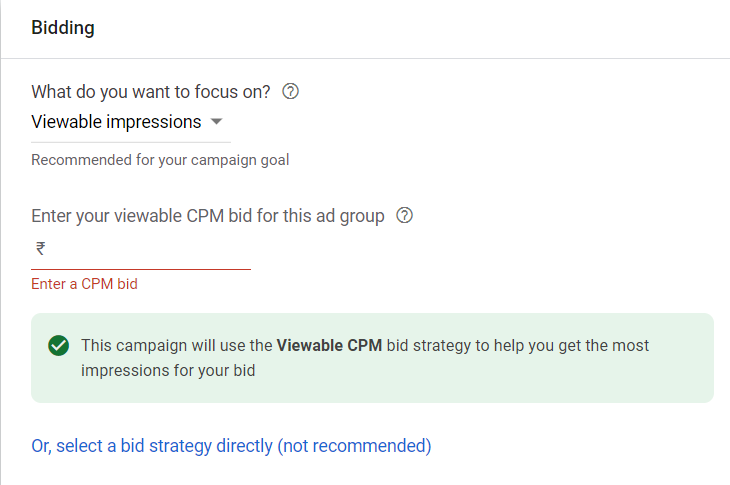
To use this strategy in Display Ads, one can directly select “viewable impressions” from the options; the same is depicted in the image below;
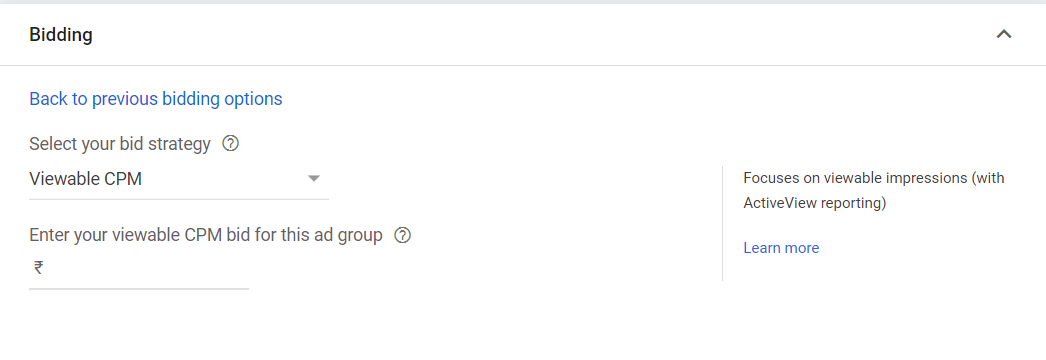
or select the option “Viewable CPM” from the Non-recommended options under display Campaign as depicted in the image below;
Automated Bidding Strategy
With Automated Bidding Strategy, Google automatically sets bid amount based on the likely hood that one’s ad will result in a click or conversion. By automating bids, there’s no need to update bids for keywords or ad groups manually. Bids are set automatically through machine learning helping in automating the bidding process; however, it has a few drawbacks. For example, the Automated bidding method can’t consider things like recent updates or events. Automated bidding can be implemented for a specific ad group, a specific campaign or across all campaigns for a given advertising account.
1. Maximise Clicks
“Maximize Clicks” bidding strategy used to generate as many clicks as possible within a specified budget. When you choose “maximize clicks” as the bidding strategy, Google Ads will automatically organize your keyword bidding to help you get as many clicks as possible within your advertising budget. The Maximize Clicks strategy aims to increase the number of visitors to your site. This bidding strategy also allows advertisers to set a maximum limit on CPC bid amounts to avoid paying too much for individual clicks. Advertisers can set a max CPC limit to help keep CPCs down while Google spends the daily budget. You can use a “standard” strategy to maximize clicks for a single campaign, or a “portfolio strategy” to maximize clicks across multiple ad campaigns.
To use this strategy in Search & Display Ads, one must select “Maximize clicks” under the option ‘Or, select a bid strategy directly (not recommended)’ options as depicted in the image below;

2. Target Impression-Per-Share
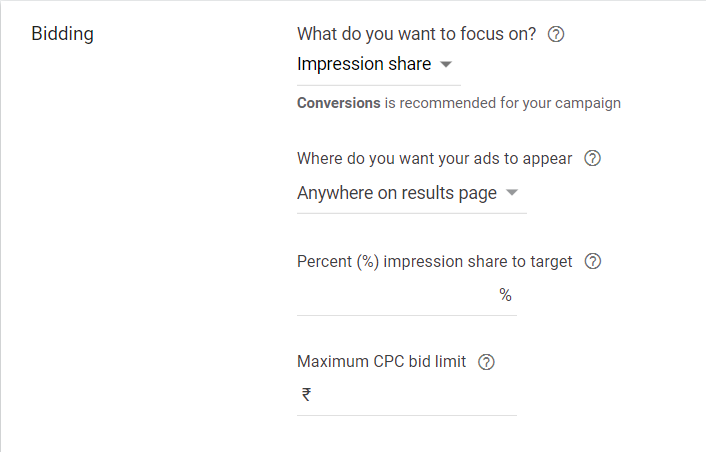
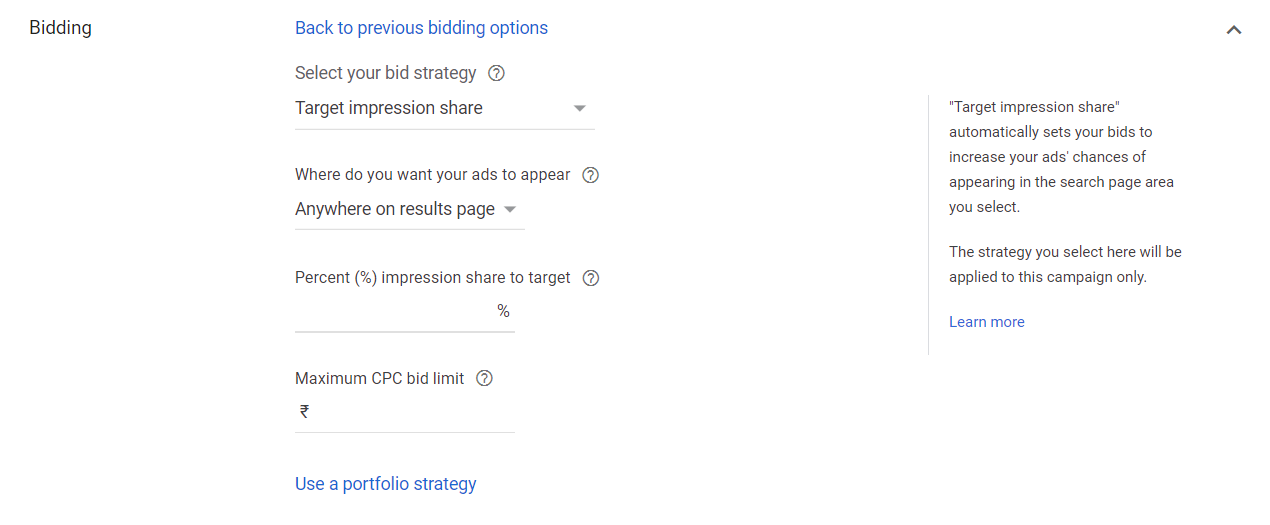
Target impression sets bids with the goal of showing your ad on the absolute top of the page, on the top of the page, or anywhere on the page of Google search results. Target Impression share works by allowing Google to automatically set bids to help your ads achieve the impression share goal you set for your campaigns. Advertiser can select among the 3 options (Anywhere on results page, Top of results page or Absolute top of results page). Once the advertiser selects where on the search results one wants to target, next is to set the “percentage impression shares to target”.
For example, you choose an Impression Share target of 70% on the top of the results page, if your ad could appear at the top of the page 100 times, Google will try to show your ad 70 of those times (Based on your 70% target)
Target Impression Share can help you rank higher in search results as it increases the visibility of your ads, but not necessarily help in growing one’s business.
To use this strategy in Search Ads, one must select the option “Impression Share” directly from bidding options as depicted in the image below;
or select the option “Target Impression Share” from the Non-recommended options, as depicted in the image below;
Smart Bidding Strategy
Smart Bidding Strategy is associated with automated bidding, and one may confuse the two as being the same thing. However, Smart Bidding is simply a bidding category that includes only conversion-based strategies. Smart Bidding Strategy uses Google’s artificial intelligence and machine learning to maximise conversion results by tracking and analysing data signals from every search and click. Using data, Google will either increase or decrease bids based on whether it believes a click will result in a conversion. For example, it will set a higher bid for a searcher who is more likely to make a purchase.
*As the Smart Bidding strategies depend upon tracking conversions, one should make sure to have conversion tracking properly set up for Google Ads account before one starts with smart bidding strategies.
1. Target Cost-Per-Action (CPA)
Target CPA is a Google Ads smart bidding strategy that sets bids to help get as many conversions as possible at or below a given target cost-per-action (CPA). Hence, Target CPA can be chosen if the advertiser wants to optimise or increase ad conversions. This smart bidding strategy uses machine learning to optimise for conversions in each auction. When the customer makes a search in google which is relevant to your business, Google ads will then generate a bid to increase conversions within the target CPA set. If your Google Ads account has historical conversion data, Google will recommend a target CPA.
To use this strategy in Search Ads, one must select the “conversions” under bidding strategies and then click on the “Set a target cost per action (optional)” options, as depicted in the image below;
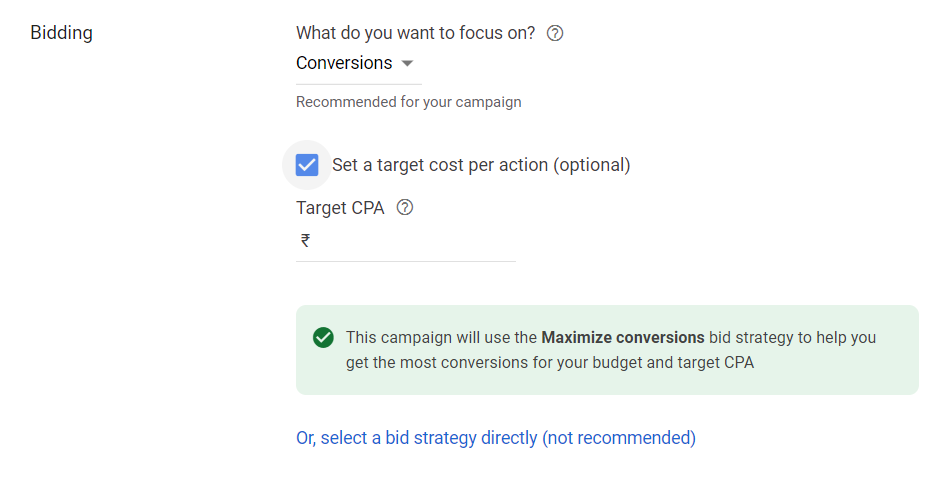
In the case of Display Ads, one can choose bidding options as “conversions” in the recommended options or select “Target CPA” from the non-recommended bidding options, as depicted in the image below

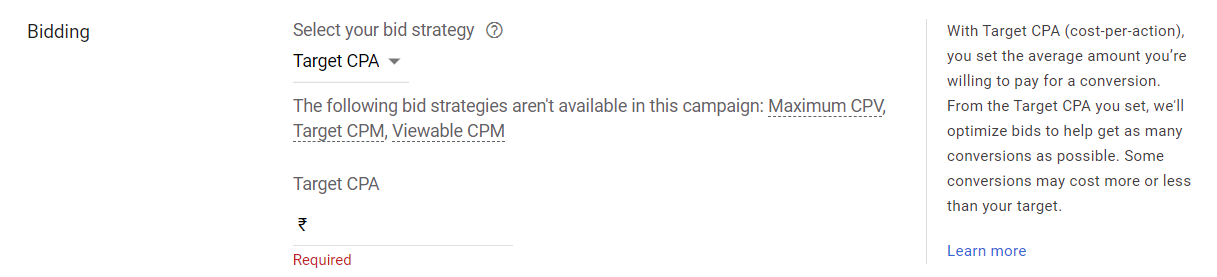
While for Video Ads, one must select the objective of the ad as “leads” thereafter select “Target CPA” under the bidding strategy options and enter the amount, as depicted in the image below;
2. Maximise Conversions
Maximise conversions is a smart bidding strategy in Google Ads that automatically sets bids using machine learning to optimise keyword bidding to generate the most conversions for your allotted budget. Maximise conversion bidding finds an optimal bid for your ad each time it’s eligible to appear. Google sets these bids to help get conversions that are the most valuable for your campaign while spending your budget. If you have bid adjustments currently set up like Geo or time of day adjustments, this type of keyword strategy will cause Google to ignore certain bid adjustments and adjust your bids automatically and in real-time using contextual indicators.
To use this strategy in Search Ads & Display Ads, one must select “Maximise Conversions” under Non-recommended bidding strategies, as depicted in the image below;
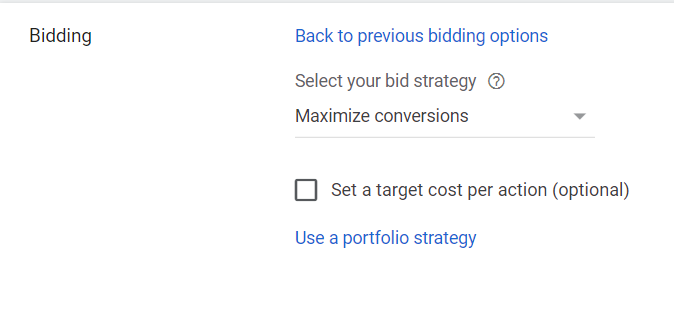
While in case of Video Ads, one must select the objective of the ad as “leads” thereafter select “Maximise Conversions” under the bidding options., as depicted in the image below;

3. Target Return On Ad Spend (ROAS)
Target return-on-ad-spend (ROAS) is a Google Ads smart bidding strategy that aims at conversion value you receive in return for every rupee you spend on your ads. Target ROAS increases CPCs for clicks that have a history of being valuable while decreasing the other ones. Google’s machine learning algorithm will then optimise your bids to achieve the highest conversion value possible while aiming for your target ROAS. Many advertisers look at this strategy reserved for e-commerce businesses.
A simple equation to calculate ROAS;
Return on Ad Spend in % = Revenue ÷ Ad Spend x 100
For example, if your goal is to get an average of ₹5000 returns in revenue for ₹2000 you spend on PPC ads, then your Target ROAS would be 250%
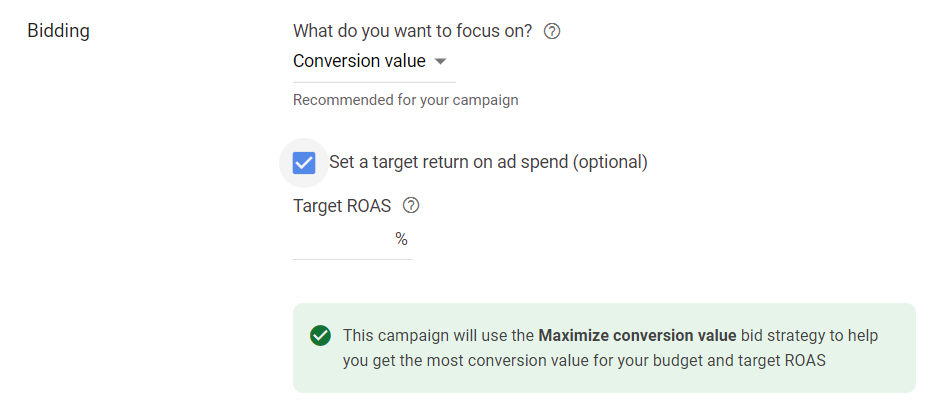
To use this strategy in Search Ads and Display Ads, one must select “Conversion value” under the bidding strategy option, click on “Set a target return on ad spend (optional)” and enter your target ROAS %, as depicted in the image below;
4. Maximise Conversions Value
When you set up conversion tracking for your Google Ads account, you’ll be asked to assign relative values to each conversion event. Maximize Conversion Value Bidding is Google’s Smart bidding strategy that attempts to capture the greatest conversion value possible with a given budget using real-time data. It may bid higher for auctions that would result in greater conversion value than auctions with lower conversion value. Maximize Conversion Value is a good fit for your campaign if your focus is growth oriented.
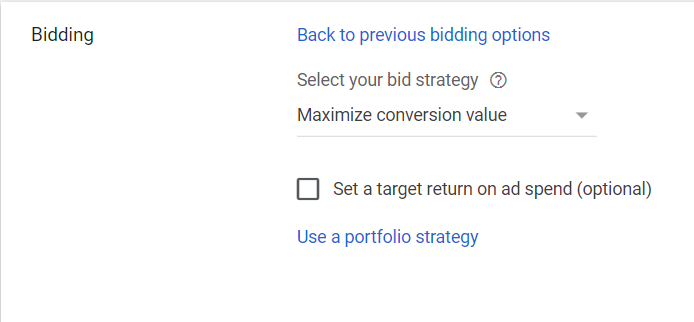
To use this strategy in Search Ads, one must select “Maximize Conversion Value” under non-recommended bidding options, as depicted in the image below;
5. Enhanced Cost-Per-Click (ECPC)
Enhanced CPC is just an extension of Manual CPC with some automation going on behind the scenes. Enhanced CPC uses the maximum cost per click that an advertiser has set in ad groups or keywords but uses machine learning to increase or decreases that bid according to the possibility that a click will lead to a sale. The main difference between the ECPC and Manual CPC is that your ad group or keyword bid can increase if Google thinks it will lead to a conversion.
To use this strategy in Search Ads, one must select “Manual CPC” under non-recommended bidding options and click on “Help increase conversions with Enhanced CPC”, as depicted in the image below;
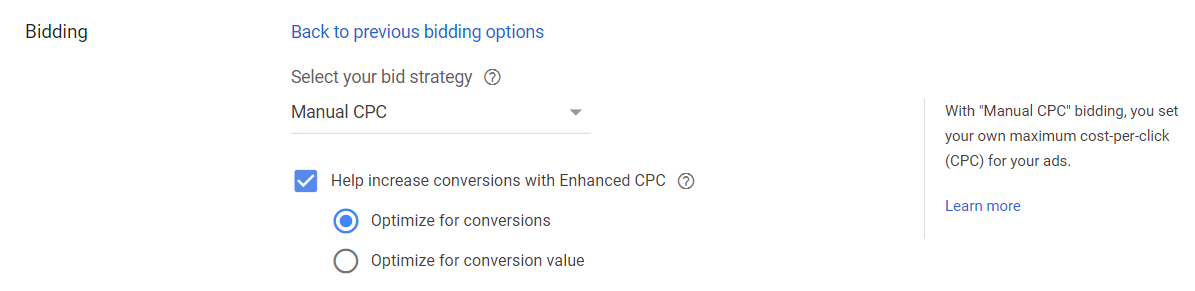
While same applies for Display Ads but, in addition to entering the amount for your enhanced CPC bid for that particular ad group, as depicted in the image below;

Portfolio Bidding Strategies
Apart from the standard bidding strategies, Google has developed Portfolio bidding strategies to help marketers and advertisers get a better understanding of their bidding efforts.
Standard bidding strategies are not shared among multiple campaign whereas, Portfolio Bidding Strategies are automated, goal-driven bidding strategies that can be shared among multiple campaigns. Portfolio bid strategies use machine learning to evaluate performance over time and optimize certain goals across set campaigns, ad groups, and keywords. When these strategies are created, they are shared across your account, to make it accessible in one location. This one-stop shop also makes it easier to track the performances of your campaigns along the way.
List of Bidding Strategy under Portfolio are as follows,
- Target CPA
- Target ROAS
- Maximize Clicks
- Maximise Conversions
- Maximise Conversions Value
- Target Impression Share
NOTE: Apart from creating Portfolio Bidding Strategy under Shared Library, it can also be selected under the above-mentioned 6 individual bidding strategies.
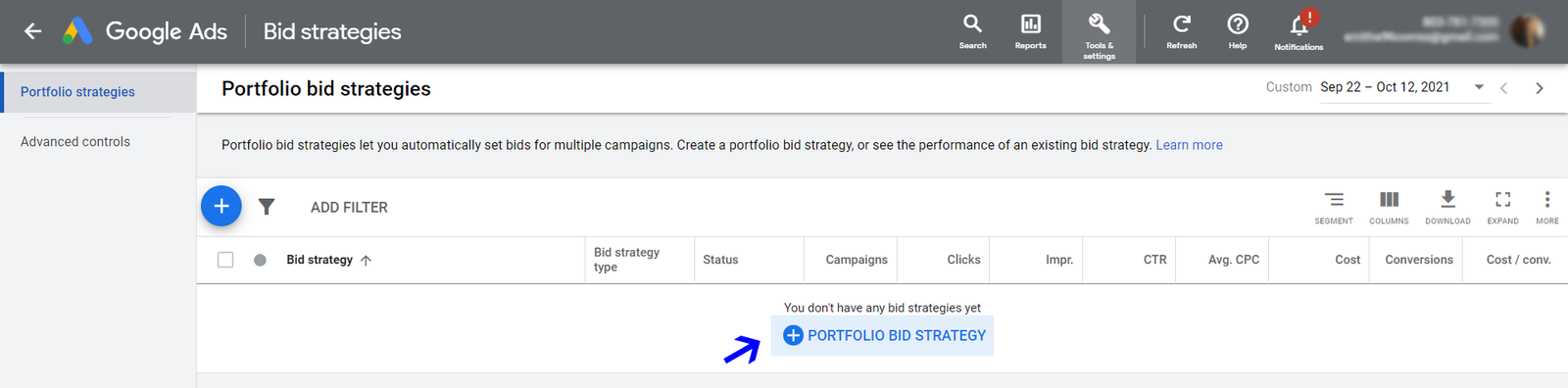
To create a Portfolio Bidding Strategy, click on “Tools & Settings” at the top-right Menu in Google ads. Under “Shared Library” click on “Bid Strategies” as depicted in the image below;
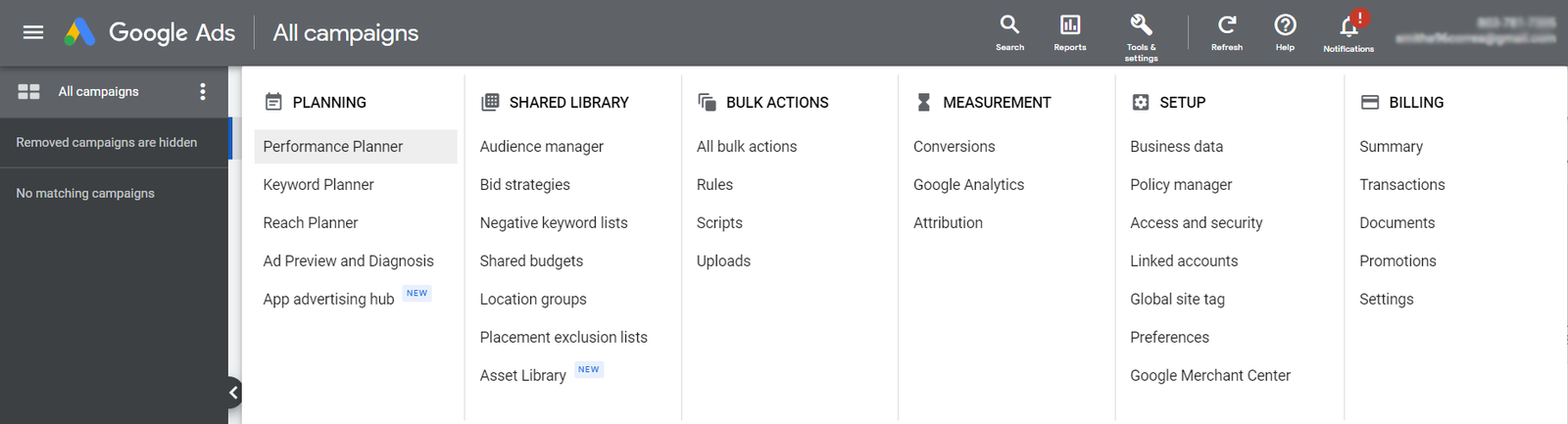
and select “+Portfolio Bid Strategy” as depicted in the image below;